Why Most HRMS Migrations Fail at the Data Layer, Not the Software
Naapbooks Insights • Hrms Migrations • 11 min read
- The Software Gets Blamed for Problems the Data Created
- The Five Data Problems That Quietly Break HRMS Migrations
- Field Mapping Is Where "Simple Migration" Gets Complicated
- The Parallel Payroll Run Is Not Optional
- Stop Asking "Is the New HRMS Ready?"
- The Contrarian Conclusion, Your Go-Live Is a Data Test
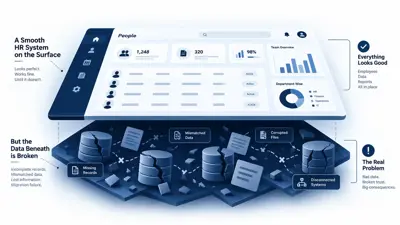
Your new HRMS probably isn't the problem. Your employee data is.
Most organisations spend months on HRMS selection. They compare dashboards, test mobile apps, evaluate integrations, and negotiate implementation timelines. Then they go live, and payroll totals don't match, managers get approval requests for people who don't report to them, and HR ends up back in Excel within three weeks, trying to "fix" the very system they just paid for.
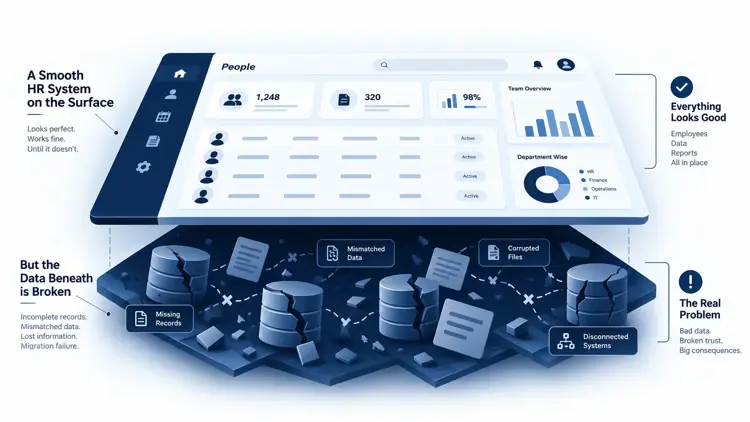
Here's the uncomfortable truth: most HRMS migrations don't fail because the software can't do its job. They fail because the data feeding that software was never fit to run the business in the first place. Duplicate employee records, inconsistent IDs, outdated salary structures, broken reporting lines, missing joining dates, mismatched leave balances, none of that gets fixed by switching systems. It just gets automated, faster and at scale.
A new HRMS cannot cleanly automate a messy data foundation. That's the whole article, really. Everything below is about what to do with that fact.
The Software Gets Blamed for Problems the Data Created
Quick answer: Most HRMS migration problems originate before the data ever reaches the new software. When source records are incomplete, duplicated, incorrectly mapped, or inconsistent across HR, payroll, and attendance systems, the new HRMS doesn't correct those problems, it reproduces them through automated workflows and calculations.
When something breaks after go-live, the instinct is to blame the nearest visible thing: the HRMS vendor, the implementation partner, a misconfigured workflow, a failed integration. Sometimes that's fair. Often, it isn't. The system did exactly what it was told to do with the data it was given. If an employee's reporting manager was wrong in the source file, the new HRMS will faithfully route their leave approval to the wrong person, quickly, consistently, and without complaint.
Your "Employee Database" Is Probably Not One Database
Quick answer: Employee information usually lives across several systems and a few unofficial ones, and migration is the moment you find out none of them fully agree with each other.
In most mid-sized organisations, "employee data" isn't a single source of truth. It's scattered across:
- The current HRMS
- Payroll software
- Excel trackers HR actually relies on
- Biometric attendance devices
- Leave management tools
- Finance systems
- Recruitment platforms
- Employee documents and email threads
- Shared drives nobody fully owns
The practical problem shows up the moment you try to consolidate: which version is correct?
HR's system says an employee belongs to Finance. Payroll's system says Operations. The attendance device is still running on an employee ID that was reissued two years ago. The reporting hierarchy in the master Excel sheet was last updated three months ago, after a reorg nobody pushed into the HRMS. Individually, each system looks fine. Side by side, they disagree constantly, and migration is what forces that disagreement into the open.
The Five Data Problems That Quietly Break HRMS Migrations
Quick answer: Most migration failures trace back to five recurring categories of data issues, duplication, inconsistent formatting, missing history, broken relationships, and payroll-specific inconsistencies.
1. Duplicate or conflicting employee records
Rehired employees often get a second record instead of a reactivated one. Duplicate employee IDs creep in across systems. A name spelled "Mohd. Aslam" in one system and "Mohammed Aslam" in another looks like two people to a machine, even though it's obviously one person to a human.
2. Inconsistent field formats
Dates stored as DD/MM/YYYY in one system and MM/DD/YYYY in another. Department names like "HR," "Human Resources," and "People Ops" all refer to the same team. Job titles that were never standardised. Employee codes with different lengths and prefixes across payroll and HR.
3. Missing historical data
Salary revision history that lived only in old appraisal emails. Original joining dates lost after a system change years ago. Leave balances that were manually adjusted once and never reconciled since. Previous employment or payroll history that simply wasn't carried forward from an even older system.
4. Broken organisational relationships
Employees mapped to managers who left the company. Departments that were renamed or merged but never updated everywhere. Cost centres that no longer exist in finance but still sit attached to active employees.
5. Payroll and statutory inconsistencies
Salary structures that were customised per employee over the years, informally, without documentation. Deduction rules applied inconsistently. Employee identifiers that don't match cleanly between HR and payroll records. These require careful validation, the kind that's easy to skip when the pressure is on to hit a go-live date.
Field Mapping Is Where "Simple Migration" Gets Complicated
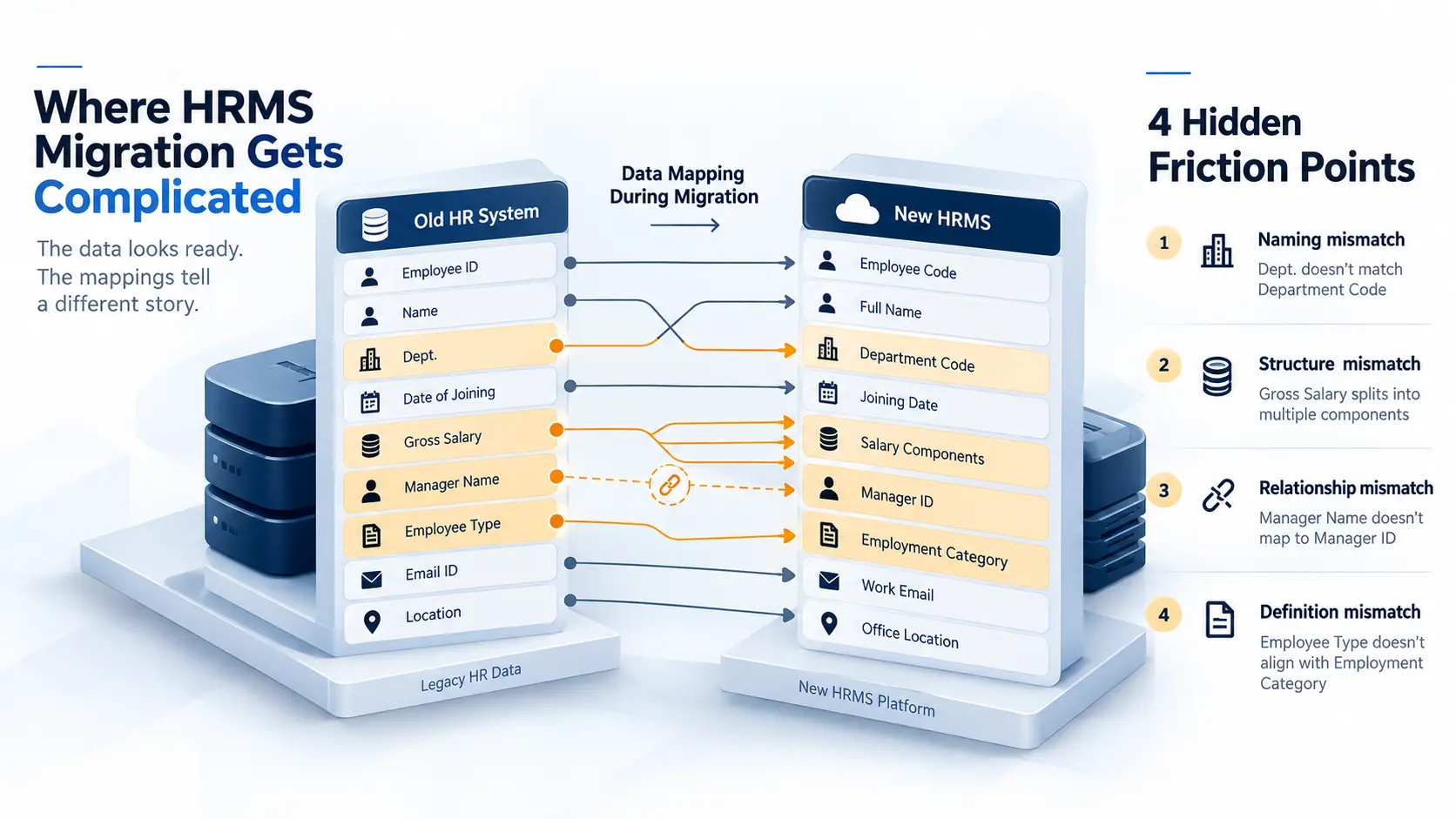
Quick answer: Migration is rarely just an old system to a new system. It's source field, transformation rule, target field, validation, and business sign-off, and skipping any one of those steps is where things quietly go wrong.
People imagine migration as: Old Excel → New HRMS. In reality, it looks more like:
Source field → transformation rule → target field → validation → business approval
Here's what that looks like in practice:
| Old System | New HRMS | Problem |
|---|---|---|
| Dept. | Department Code | Naming mismatch |
| Gross Salary | Salary Components | Structure mismatch |
| Manager Name | Manager ID | Relationship mismatch |
| Employee Type | Employment Category | Definition mismatch |
A field that looks identical on the surface can mean something entirely different in another system. "Employee Type" in your old system might mean permanent versus contract. In the new HRMS, "Employment Category" might also fold in intern, consultant, and probationary status, categories your old data never distinguished. Map that carelessly, and every downstream report is wrong from day one.
Cleaning Data After Go-Live Is More Expensive Than Cleaning It Before
Quick answer: Fixing data before migration is a planning problem. Fixing it after employees are already relying on the new system is an operational crisis.
Once go-live happens and people start using the system for real work, the cost of bad data compounds fast:
- Employees notice incorrect leave balances and start raising tickets
- Payroll discrepancies surface in the first cycle, sometimes affecting net pay
- Managers get approval requests for people who don't actually report to them
- Headcount reports don't match what finance and HR each believe
- Finance finds mismatched payroll totals during reconciliation
- HR quietly starts maintaining Excel "fix files" on the side, which is exactly the fragmentation the new HRMS was supposed to end
This is the part worth sitting with: the worst outcome isn't a failed migration. It's a successful go-live running on bad data. Nobody stops the project. Everybody just starts working around a system that technically launched on time.
The Parallel Payroll Run Is Not Optional
Quick answer: Running old and new payroll side by side, before the new system becomes the system of record, is what surfaces discrepancies while they're still cheap to fix.
Parallel runs should compare gross salary, deductions, net salary, leave impact, attendance impact, and individual payroll components at the employee level, not just totals at the org level, since totals can look fine while individual records are wrong in offsetting ways. There's no universal number of cycles that works for every organisation; how long you run parallel depends on payroll complexity and how much risk the business can tolerate. What matters is that it happens before the new system takes over as the source of truth, not after.
The Real Migration Checklist Starts Before the Migration
Quick answer: A practical pre-migration framework focuses on data readiness first, software configuration second.
- Inventory - What data exists, and where does it actually live?
- Ownership - Who owns each dataset, and who can approve changes to it?
- Cleanse - What's incomplete, duplicated, or outdated?
- Map - How does each source field translate into the new system's structure?
- Validate - What business rule confirms the migrated data is actually correct?
- Reconcile - Do employee counts, payroll totals, and leave balances match across old and new?
- Test - Can real workflows, leave approval, payroll run, reporting, execute correctly end to end?
- Sign off - Who formally approves the data before go-live, and are they accountable for that approval?
Most of this happens before a single HRMS screen gets configured for production use. That's the point.
Stop Asking "Is the New HRMS Ready?"
Quick answer: The question that actually predicts success isn't about the software, it's about the data.
The standard go-live question is: "Is the new HRMS ready?" It's the wrong question, or at least an incomplete one. A system can be fully configured, integrated, tested, and accessible to every employee, and still fail on day one, because the data behind it is incomplete, inconsistent, duplicated, unmapped, or unverified.
The better question is: "Is our data ready to run the business through the new HRMS?" That question forces a different kind of preparation, one focused on the organisation's records, not the vendor's feature list.
Where FlowShift Fits Into the Bigger Migration Problem
This is really the core idea behind FlowShift by Naapbooks: the goal of a system migration was never just to move from one piece of software to another. The goal is to make the underlying business processes and data actually work correctly in the new environment, so the new system reflects how the business really operates, not just what a vendor's demo showed.
That's why HRMS and ERP migration, done properly, has to be treated as a structured process rather than a software replacement exercise. FlowShift is built around that idea, approaching business transformation as something that starts with getting the data, structures, and dependencies right, and only then expecting the new system to deliver on its promises. If you're evaluating what a more structured approach to modern ERP transformation actually looks like, FlowShift is worth a look.
The Contrarian Conclusion, Your Go-Live Is a Data Test
The biggest mistake in HRMS migration is treating data migration as a technical checkbox near the end of implementation, something the IT team or the vendor handles in the final few weeks. It should be treated as the foundation of the entire project, from day one, not an afterthought bolted onto configuration.
Your go-live doesn't fail at the software. It fails when the software is asked to automate data the business never properly understood in the first place.